Cofense: fake 'Project Bid Invitation' emails with locked PDFs lead to fake Microsoft login
Cofense's Phishing Defence Centre described on 27 October 2026 a credential phishing campaign built around emails titled "Project Bid Invitation - Proposal Due August 35, 2026". The email says full details are in a pa…
- First reported
- Reports
- 1
Source: cofense.com · published
What happened
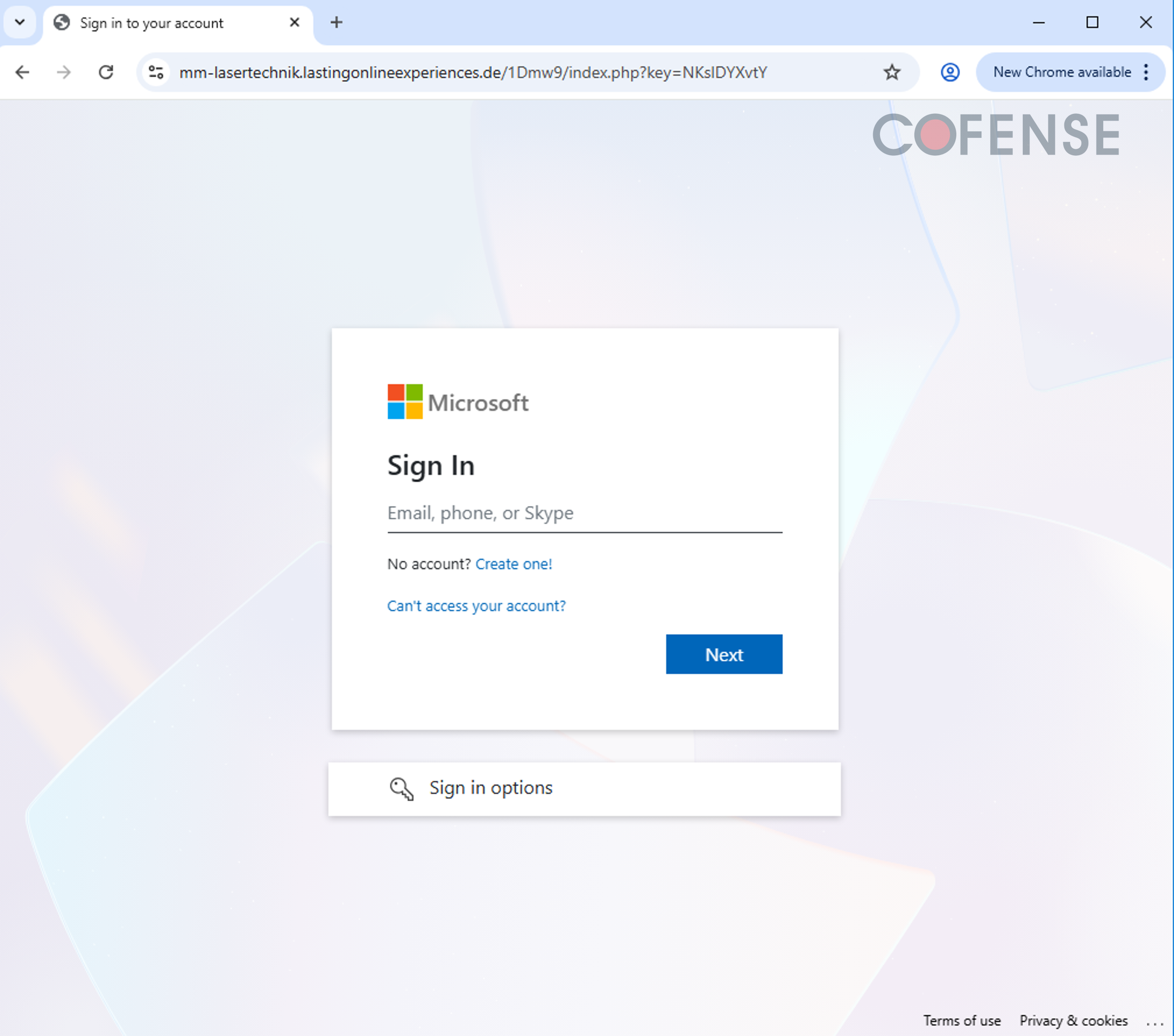
Cofense's Phishing Defence Centre described on 27 October 2026 a credential phishing campaign built around emails titled "Project Bid Invitation - Proposal Due August 35, 2026". The email says full details are in a password-protected PDF attachment. Cofense notes that password protection lends the file an air of legitimacy and that most email security tools cannot inspect an encrypted file's contents. It says the sender address may be a legitimate but compromised account. Once unlocked, the PDF shows a OneDrive-style "View/Download" button linking to slotpastimaxwin50jt.online. Cofense reports that this leads to a fake shared-document page, then an email prompt and a fake Microsoft sign-in page at mm-lasertechnik.lastingonlineexperiences.de. Entered credentials are sent to nbpn.lastingonlineexperiences.de.
How the scam works
The campaign borrows from routine sales work. An invitation to bid carries urgency, and professionals are conditioned to treat it with care. The attached PDF is locked, and the password is given in the email, so the recipient does the unlocking and scanners see nothing. The unlocked page offers a single button designed to look like a OneDrive preview, so there is nothing to compare it with.
Clicking opens a page that resembles a shared drive, with a list of files that look related to a real contract (such as a proposal template and a confidentiality agreement) and checkboxes to choose files. Pressing "Download Selected" brings up a pop-up asking for an email address, as real sharing platforms do, then a fake Microsoft sign-in page that asks for the email and the password. The credentials are posted to the attacker's server.
Cofense advises checking whether a bid was expected, whether the sender's domain checks out, and whether the login page URL matches the platform it claims to be. If something feels off, contact your IT or security team before entering credentials. Microsoft and the company name in the sample are not accused; Microsoft is imitated.
Source
Cofense Phishing Defence Centre, "Locked and Loaded: Phishing through Fake Bids and Protected Documents" (27 October 2026).
Red flags
- An unexpected invitation to bid, with a deadline that doesn't exist (the sample says 'August 35, 2026').
- A password-protected PDF with the password in the email body.
- A button in the PDF styled like OneDrive but pointing to an unrelated domain.
- A shared-document page that asks for your email before a download.
- A Microsoft sign-in page whose address isn't a Microsoft domain.
If you were targeted
- 1Don't open password-protected attachments from senders or bids you weren't expecting; confirm with the sender by phone first.
- 2Check the address bar before entering credentials: a real Microsoft sign-in page is on a Microsoft domain.
- 3If you entered your password, change it immediately, sign out of other sessions and tell your IT team.
- 4Report the email to your security team and use your mail client's phishing-report option.
- 5Turn on multi-factor authentication and review your account's recent sign-in activity.