Fake 'phishing simulation' email ('Security Alert: Potential Threat Detected') uses skyverticals.com
PCrisk reports a phishing email with the subject "Security Alert: Potential Threat Detected" that poses as an authorised security simulation from the recipient's company or email provider. It tells the reader not to c…
- First reported
- Reports
- 1
Source: pcrisk.com · published
What happened
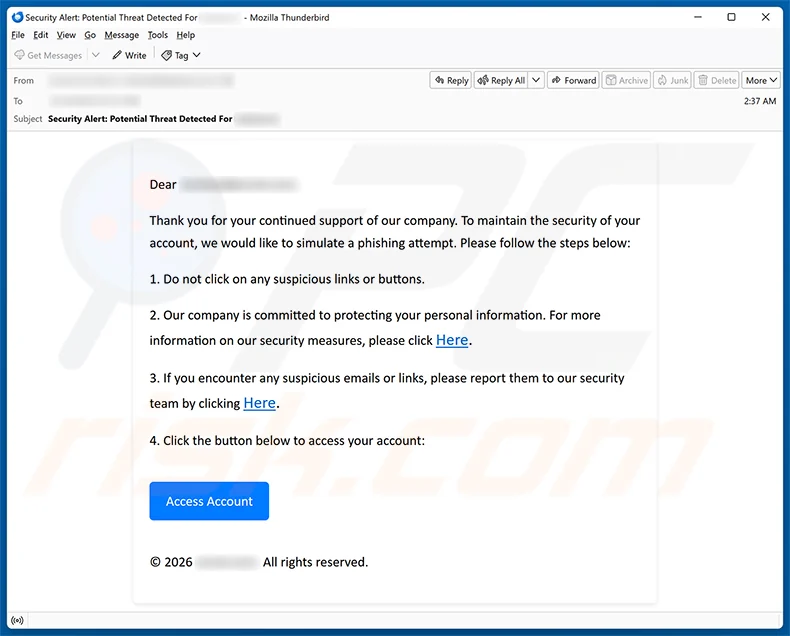
PCrisk reports a phishing email with the subject "Security Alert: Potential Threat Detected" that poses as an authorised security simulation from the recipient's company or email provider. It tells the reader not to click suspicious links, and ends with an "Access Account" button. The button leads to a fake login page on skyverticals.com that adapts to the recipient's email provider (for Gmail users, a counterfeit Google sign-in page) and sends entered passwords to the scammers. Google and other imitated services are not involved, and PCrisk does not accuse any named company. The message addresses the recipient by name and company, which has been blurred in the sample.
How the scam works
The trick is the framing. The email says it is a planned phishing test and lists sensible advice, such as not clicking on suspicious links or buttons. It then asks the reader to "click the button below to access your account". An employee who has been told such tests exist may think the message is part of one and click through to prove they are alert. The "Here" links and the corporate-sounding wording add to the effect.
The destination is skyverticals.com, a domain unrelated to the recipient's employer or email provider. PCrisk says the page detects the recipient's email provider and shows a matching sign-in screen, so a Gmail user sees a Google-style page. Typed passwords are sent to the scammers.
PCrisk concludes the message is a phishing scam. As with similar campaigns, a stolen email password can be used to reset other accounts, read confidential mail and send further phishing to colleagues. A genuine internal simulation does not need you to enter your password on a page reached from a link in the email; if in doubt, ask your IT team through a channel you already trust.
PCrisk notes that campaigns of this kind are sometimes also used to distribute malware, rather than or in addition to harvesting credentials, so a click should never be treated as harmless.
Source
PCrisk, "Phishing Attempt Simulation Email Scam" (removal guide, 27 October 2026).
Red flags
- An email that says it is a 'phishing simulation' but asks you to log in.
- A security notice that tells you not to click links, then supplies a button to click.
- A sign-in page that changes to match your email provider, on an unrelated domain (here skyverticals.com).
- A generic corporate sign-off with no named sender.
- A request to 'access your account' to prove you're alert.
If you were targeted
- 1Don't click the button; check the message with your IT team through a known channel.
- 2If you entered your password, change it now and sign out of all sessions.
- 3Turn on multi-factor authentication for your email and check mailbox rules.
- 4Report the email as phishing in your mail client.
- 5Use your company's official reporting process for any real security test.