Fake 'Zoom Audio Message' emails lead to credential-stealing page on rnailzoom.com
PCrisk, a malware-removal and security-news site, reported in October 2026 on a phishing email titled "New Secured Audiomail From ..." that imitates a Zoom notification. The message says the recipient has received a s…
- First reported
- Reports
- 1
Source: pcrisk.com · published
What happened
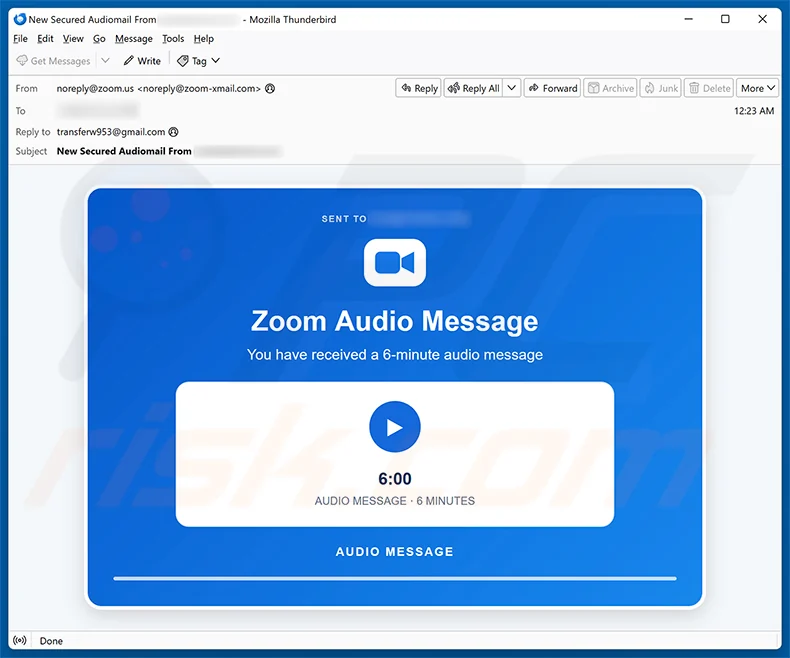
PCrisk, a malware-removal and security-news site, reported in October 2026 on a phishing email titled "New Secured Audiomail From ..." that imitates a Zoom notification. The message says the recipient has received a six-minute "Zoom Audio Message" and shows a play button. The sender line is made to look like a Zoom address, with a reply-to address on a free webmail service. Zoom is impersonated and is not involved: PCrisk says criminals are abusing its name and logo purely to make the emails look credible.
How the scam works
The email is built to trigger curiosity. A voicemail-style audio message from an unknown sender seems harmless and urgent, so recipients click the play button. According to PCrisk, the button opens a credential-stealing page at rnailzoom.com, a look-alike address in which the letters "rn" imitate an "m". The page shows a fake login portal for the recipient's email provider. Anything typed there, including the email address and password, is sent to the attackers.
With an email password a criminal can read the victim's mail, reset passwords for other accounts, send further phishing messages from the victim's address and look for invoices or other information that can be used for fraud. People often reuse the same password, which widens the damage.
PCrisk notes that this type of scam email is sometimes also used to spread malware, so recipients should delete the message without clicking anything. The tell-tale signs are the mismatch between the sender name and the real address, the generic message with no details about who sent it, and the web address in the link. Genuine Zoom notifications come from Zoom's own domains, and an unexpected audio message that requires a login on a different page is not something Zoom sends.
Source
PCrisk, "Zoom Audio Message email scam", October 2026.
Red flags
- An unexpected "audio message" notification from Zoom.
- A sender address that is not on a Zoom domain, plus a reply-to on a free webmail service.
- A link to a look-alike domain (rnailzoom.com, where "rn" imitates "m").
- A login page that asks for your email password to play the message.
- A generic message that does not say who sent the audio.
If you were targeted
- 1Delete the email without clicking the button.
- 2Check the sender's full address and hover over links before clicking.
- 3Never enter your email password on a page reached from an unexpected email.
- 4If you entered a password, change it at once, enable two-factor authentication and review your mailbox rules.
- 5Report the email as phishing to your provider and to your IT team.