'Microsoft Policies Update' phishing email sends users to fake login on cocoonwoodsavoie.com
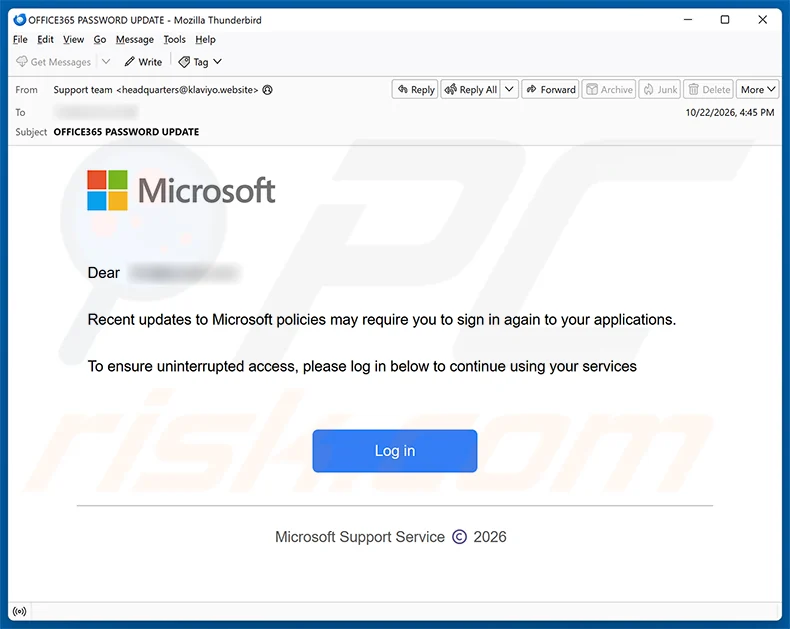
PCrisk reports a phishing email posing as "Microsoft Support Service" with the subject "OFFICE365 PASSWORD UPDATE". It says recent updates to Microsoft policies may require the recipient to sign in again to their appl…
- First reported
- Reports
- 1
Source: pcrisk.com · published
What happened
PCrisk reports a phishing email posing as "Microsoft Support Service" with the subject "OFFICE365 PASSWORD UPDATE". It says recent updates to Microsoft policies may require the recipient to sign in again to their applications, and urges them to click a "Log in" button to continue using their services. The button opens a fake Microsoft sign-in page hosted at cocoonwoodsavoie.com that asks for an email, phone or Skype name and captures the credentials. Microsoft is impersonated and has no connection to the scam. The message addresses the recipient generically (as "Dear" followed by a name or address), and the sender address shown does not belong to Microsoft.
How the scam works
This is a routine credential phish. The email claims a policy change, which suggests a harmless administrative step, and the single "Log in" button leaves little room for doubt. The page behind it copies Microsoft's sign-in screen, including its prompt for an email, phone or Skype name, but lives at cocoonwoodsavoie.com, a domain that has nothing to do with Microsoft.
Whatever is typed into the fake page goes straight to the operators. A stolen Microsoft password can open email, OneDrive files and connected services, and can be used to send further phishing to the victim's contacts or to reset passwords on other accounts. Because attackers often test stolen credentials at once, speed matters if you have already entered yours.
PCrisk's conclusion is that this is a phishing scam disguised as an official Microsoft security notice whose purpose is to steal Microsoft account login credentials, and that recipients should ignore the email and avoid clicking any links it contains.
PCrisk notes that campaigns of this kind are sometimes also used to distribute malware, rather than or in addition to harvesting credentials, so a click should never be treated as harmless.
Source
PCrisk, "Microsoft Policies Update Email Scam" (removal guide, 27 October 2026).
Red flags
- An email that claims recent 'policy updates' require you to sign in again.
- A sender that calls itself Microsoft Support Service but isn't from a Microsoft domain.
- A 'Log in' button that leads to an unfamiliar web address.
- A generic greeting rather than your name.
- A sign-in page that isn't on a Microsoft domain.
If you were targeted
- 1Don't click the link; open your Microsoft account by typing the address yourself.
- 2If you entered your credentials, change your password straight away and sign out of all sessions.
- 3Turn on multi-factor authentication and review recent sign-in activity and mail forwarding rules.
- 4Report the email as phishing in your mail client and delete it.
- 5Warn your IT team if it arrived at a work address.