'Quotation Request' emails lead to fake WeTransfer page wetransfers-ten.vercel.app that asks for email passwords
MalwareTips reports in a post published October 20, 2026 on a 'Sample Files for Your Review' email scam aimed at businesses. A message headed 'Quotation Request' approaches recipients as a potential business contact a…
- First reported
- Reports
- 1
Source: malwaretips.com · published
What happened
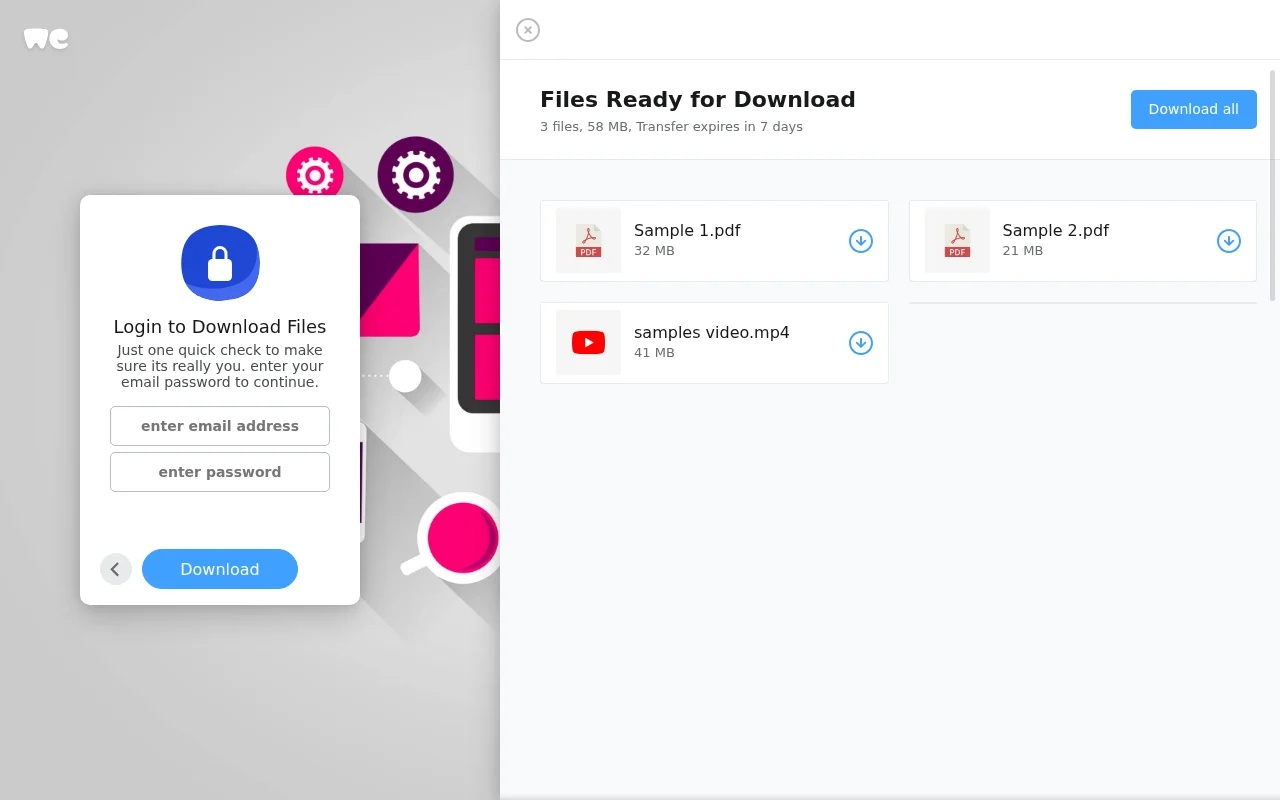
MalwareTips reports in a post published October 20, 2026 on a 'Sample Files for Your Review' email scam aimed at businesses. A message headed 'Quotation Request' approaches recipients as a potential business contact and asks them to retrieve samples through WeTransfer and confirm receipt. According to MalwareTips, the associated page at wetransfers-ten[.]vercel[.]app imitates WeTransfer, showing two PDF entries and a sample video next to a box asking for the recipient's email password; MalwareTips calls the form a phishing trap for the business mailbox. MalwareTips notes the page is hosted on Vercel rather than the normal WeTransfer transfer route, and says WeTransfer and Vercel are legitimate services whose names or infrastructure are being abused; neither sent the email or operates the phishing page. MalwareTips says no password was entered and the files were not downloaded during its check. It advises verifying unexpected quotation requests through independently found contact details and never entering a mailbox password on a file-sharing page.
How the scam works
MalwareTips says the sender presents the shared samples as necessary background for a quote, giving the recipient a business reason to open the link instead of ignoring an unexplained attachment. The signature may include a company name, job title, address or phone number copied from real people without their knowledge, so finding a real business with that name does not verify the email. The only meaningful check is whether that business confirms sending this request, using contact details from your own records or its independently found website.
The destination shows a transfer that looks ready to download, with two PDF icons, a sample video, file sizes and an expiry notice. MalwareTips notes that the sizes shown don't add up to the total advertised, but says the page would be just as dangerous if they did. The form presents itself as an identity check before downloading and asks for the email password, not just the address. A genuine transfer might use a separate access password or an emailed code, but it would not ask an unrelated web page for your mailbox password. Testing the form with a real password is risky, because a phishing form can record what you type before showing an error. With a working login, an intruder could read customer conversations, invoices, attachments and password-reset emails and use the contact list for further fraud, depending on the account's protections.
Source
MalwareTips, "Sample Files For Your Review Email Scam: Fake WeTransfer Password Check" (published 20 October 2026).
Red flags
- An unexpected 'Quotation Request' with samples to download.
- A file-sharing page that isn't on wetransfer.com, such as a vercel.app address.
- A download page asking for your email password.
- File sizes or details that don't add up.
- A sender you can't confirm through your own records.
If you were targeted
- 1Don't enter your email password on the page.
- 2Verify the request with the business using contact details you find yourself.
- 3If you entered a password, change it at once, sign out other sessions and turn on multi-factor authentication.
- 4Check your mailbox for new forwarding rules or unfamiliar sign-ins, and tell your IT team.
- 5Warn your contacts if your account may have sent messages, and report the email as phishing.