Skip to content
Scammers.com
ImpersonationReviewed

Researcher flags 'Authenticator App - 2FA, OTP' App Store listing using Google Authenticator-style icon

Security researcher Alex Kleber (@privacyis1st), who tracks misleading App Store listings, posted on X on 14 November 2026 about the iOS app "Authenticator App - 2FA, OTP" (App Store ID 6751569816), which he says borr…

First reported
Reports
1

Source: x.com · published

Illustration: Impersonation scams

What happened

Security researcher Alex Kleber (@privacyis1st), who tracks misleading App Store listings, posted on X on 14 November 2026 about the iOS app "Authenticator App - 2FA, OTP" (App Store ID 6751569816), which he says borrows Google Authenticator's colours and six-spoke icon while being published by an unrelated developer, not Google. According to his post, the app is sold at $7.99 a week (about $415 a year), its terms describe a translation app, and its privacy label discloses tracking. Apple's App Store lookup confirms the listing is live and that the seller is not Google. Google is not involved. When installing an authenticator app, check the publisher name before downloading or subscribing.

How the scam works

Impersonation schemes borrow a trusted name — a school, a police force, a bank, a well-known person or a regulator-registered firm — so that a message, a website or a phone number looks official. The real organisation is not involved and will not ask you to pay, log in or send money through a surprise link or an unlisted number. Look up the official contact details yourself and call or write there. If you have already paid or given personal information, contact your bank and report the incident to the police or your national cyber-crime service.

If a message, a page or a caller creates urgency about money, a login or a legal threat, pause and check the claim through a contact method you already trust. Keep screenshots, reference numbers and the exact addresses or phone numbers you were given, and tell your bank early if money has already left the account. Official brands and authorised firms named in a lure are not involved unless a primary source says otherwise.

Source

Source: https://x.com/privacyis1st/status/2121527022992105771 (@privacyis1st, Nov 14, 2026, 3:53 AM ET)

Red flags

  • A message, page, group or phone number that uses a trusted organisation's or person's name, logo or contact details.
  • A request to pay, log in, or send money or personal information through an unofficial number or link.
  • Contact details that do not match the ones on the organisation's official website.
  • Urgency about an admission, a refund, a fine, an investigation or a limited offer.

If you were targeted

  1. 1Do not pay or log in through a link or number from the unexpected message.
  2. 2Look up the official website or phone number yourself and contact the organisation there.
  3. 3If you have already paid or shared information, contact your bank and report it to the police or your national cyber-crime service.
  4. 4Report the fake page, group or number to the platform and to the real organisation.
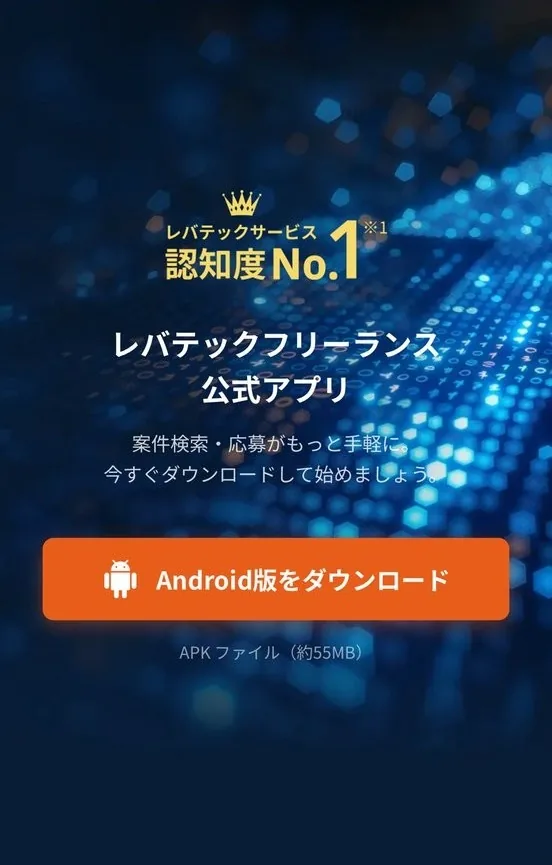
Cropped screenshot of a fake Levtech Freelance official-app page with an Android APK download button
PhishingReviewed

Researcher flags fake Levtech Freelance app site app.freelance-levtech.info serving Android malware

Japanese security researcher @masaomi346 posted on X on 14 November 2026 that hxxps://app[.]freelance-levtech[.]info hosts Android malware posing as Levtech Freelance (レバテックフリーランス), a Japanese freelance IT job service…

  • app.freelance-levtech.info
  • Page offers 'Android版をダウンロード' APK; VirusTotal SHA-256 ba96c4e1fc238fef...9079055
Reported Nov 14, 20261 report